Winston

Your Mac changed. Your tools did not.

Overnight jobs, local models, containers and build caches fill the drive and steal focus. Winston is the companion that explains what is going on and what is safe to do next.

Built for modern workloads Explain before you act Private on your Mac One-time purchase

The shift

People do not just browse and type on a Mac anymore.

They leave agents running. They pull multi-gigabyte models. They stack toolchains until the SSD begs for mercy. Old “junk cleaner” thinking was never built for that.

What your Mac is doing now

Long unattended jobs. Local inference. Docker images. Xcode DerivedData. Package caches. Creative render leftovers. Login items you forgot existed.

The symptoms feel familiar: slowdowns, vanishing free space, fans, uncertainty. The causes are new.

What you actually need

Not a panic button. A clear companion: what changed, why it matters, what is safe to reclaim, and whether the Mac can stay awake while a job finishes.

That is Winston. Explain first. You approve. Everything stays on your machine.

Built for how you work

Four jobs Winston takes off your plate

Each one maps to a real interruption in a modern workflow.

  1. 01

    “Where did forty gigabytes go this week?”

    What usually happens: Storage Settings shrugs. You buy a bigger drive. Winston: names Docker data, build products, model stores and regenerable caches before you delete anything.

  2. 02

    “The Mac slept mid-job and wasted the last three hours”

    What usually happens: You babysit the machine or dig through Terminal. Winston: Keep Awake from the menu bar, with duration and power options.

  3. 03

    “It feels slow and I do not know if I should care”

    What usually happens: Restart hope. Activity Monitor numbers. No next step. Winston: Home and Explain My Mac turn live vitals into plain English and a clear action.

  4. 04

    “I will not upload my disk to someone else’s cloud”

    What usually happens: Tools that want an account to “analyse” your machine. Winston: private by design. Winston works from local information.

Category check

Old Mac utilities vs Winston

Same shelf in a store listing. Different job once you open them.

Question you ask Yesterday’s utilities Winston
What is this app for? Clear “junk” and sell a subscription Help you understand and look after the Mac you run today
Before anything is removed A vague total and a big button Named items, plain English, consequence of removal
Modern tool clutter Generic caches, if anything Xcode, Docker, Homebrew, package caches, Ollama, LM Studio
Long overnight work Not their problem Keep Awake so idle sleep does not interrupt the run
When the Mac feels wrong Upsell screens and scare meters Ask Winston. Answers from live local data
Where your data goes Often a cloud account for “insights” Stays on your Mac
How you pay Monthly or yearly rent One payment for this version
Who decides The app pushes “clean all” You select. You approve. Trash first

The point is not that older cleaners are evil. They were built for a quieter Mac. Yours is busier.

Why people stick

Control first. Clarity second. No scare meter.

You fear the wrong delete more than a full disk

That fear is rational when a job, a model or a project can disappear with one careless click.

Winston explains first and moves selected items to Trash, so recovery is still possible.

You want answers without homework

Activity Monitor and Storage Settings show numbers. They rarely tell you what to do.

Winston turns those numbers into a next step you can take in the same app.

You already pay for enough tools

Another monthly cleaner fee feels like rent on your own computer.

One launch price. Lifetime licence for this version. 14-day trial with no credit card.

You can verify the promises yourself

No invented star ratings on this page. Just product behaviour you can check on your Mac.

Notarized by Apple. On-device analysis. You approve every cleanup.

In practice

Open it and know what needs attention

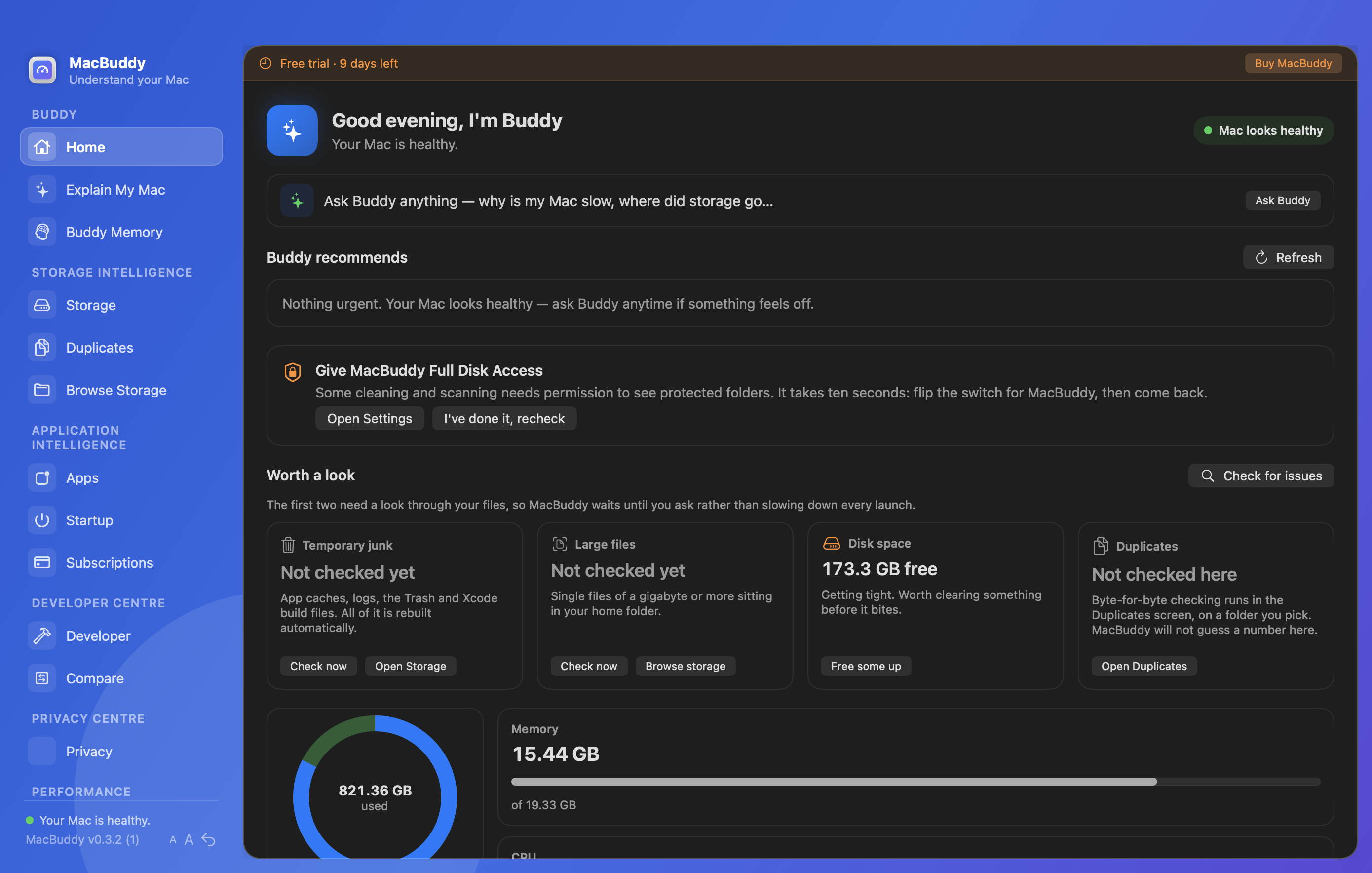
Home, storage and Winston follow the same rule: explain, then act.

Notarized by Apple Clean Gatekeeper download

Explain first Before anything is removed

You approve No silent mass deletes

On-device Winston Files stay on your Mac

Your Mac should not need a technical manual, or another monthly bill.

Winston’s job is four answers: what is happening, why, what you should do, and whether Winston can do it for you.

See it

Recommendations you can understand

Not a guilt trip. A clear view of what deserves attention on the Mac you use for real work.

Winston Home with recommendations

Try Winston free for 14 days

See your own tool clutter, models and caches with explanations first. No credit card. Current download: Winston 0.4.0.

Start my free trial

Launch offer

One payment. Keep the companion.

Buy once for this version. Keep using it while your workload keeps changing.

$17.99 launch price · once · not a subscription

Introductory launch price. Your licence key is emailed to your PayPal address after checkout.

Included

  • Explain-first storage and complete app removal
  • Winston answers from live local data
  • Developer cleanup and Keep Awake
  • Lifetime licence for this version

Trouble with the button? Open PayPal checkout directly

$17.99 USD · Fuzzelogic Solutions Limited.

Keep reading

Related guides